
CVS Health
CVS PharmacyMedical
4.5159.52K Reviews
- Version
- 26.10.33
- Installs
- 10.00M
- Age Rating
- Everyone
Screenshots

Our Review of CVS Health
 Analysis by Appyee
When I need to handle a prescription, arrange a routine health visit, and keep track of a store purchase, I’d rather not begin three separate searches. CVS Health is most useful when those errands already connect to CVS: it brings pharmacy tasks, health care scheduling, and ExtraCare shopping into one place. That convenience has a clear boundary, though. It works best as a companion to CVS services, not as a universal medical record or a replacement for a clinician’s advice.
Start with the errand, not the menu
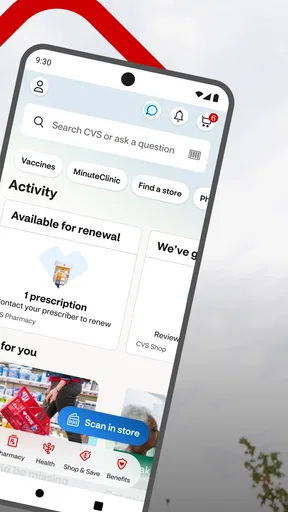
I’d open the app with one practical question in mind: am I here for a refill, a health appointment, or a shopping trip? That small choice helps keep the experience focused. If I’m dealing with a prescription, I can go straight to the pharmacy side; if I need care, I can look at scheduling; if I’m buying household or health products, ExtraCare savings are relevant. It is a useful arrangement for people who already visit CVS, although someone who uses several unrelated pharmacies and clinics may still have to jump between different services.
CVS Health is a free medical app from CVS Pharmacy, and its broad appeal is reflected in its reach: it has passed 10 million installs. Its average rating is 3.3 from around 399,000 ratings, a mixed picture that I’d treat as a reminder to judge the app by the tasks I actually need rather than assume every feature will suit everyone. It is rated for Everyone, and the current version is 25.12.42, with Android 10 as the minimum operating system. Those details make it easier to decide whether it fits a household’s devices before building a routine around it.
A prescription workflow that rewards preparation
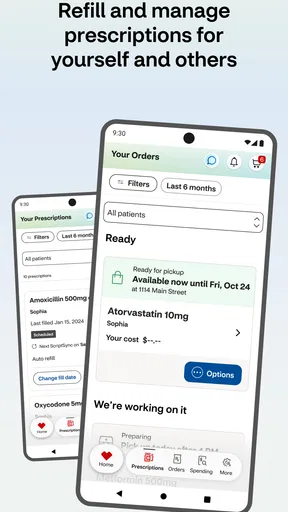
For a refill, the most useful habit is to check the prescription details before you are nearly out. That gives you time to spot an unexpected issue and decide whether you need to contact the pharmacy rather than relying on a last-minute tap. I would also keep the medication name and the pharmacy location in mind when starting the task; that makes it easier to notice if I’ve selected the wrong item or branch. The app can reduce routine back-and-forth, but it cannot remove the need to confirm that the prescription is the right one and that the pharmacy can fill it.
That distinction matters especially when managing medicine for someone else. A family member may know the medication schedule but not have the account details, or the person collecting the prescription may be different from the person who needs it. I would sort out who is handling the account and pickup before relying on the app to coordinate the handoff. For complicated medication questions, a pharmacist or prescriber remains the better source than any screen in a retail health app.
As a real-world example, imagine realizing after dinner that a regular prescription needs attention before the next workday. I’d use the app to check the refill task and the pharmacy information, then make a note of anything that needs a direct call or clarification. If the request goes through normally, I have saved a separate trip just to start the process; if something needs human attention, I know that early enough to follow up. The practical win is not that every problem disappears, but that the first step is easier to take from home.
From pharmacy task to care and checkout
I find the app most useful when a pharmacy errand is only one part of the day: the next step might be arranging care or deciding what to pick up in store. In the sections that follow, I look at how those handoffs affect the overall routine and why a little planning can make the experience smoother.
When the next step is an appointment
The health care scheduling side makes the app more than a refill shortcut. If I want to arrange a routine visit or vaccination, having that option alongside pharmacy tasks can be handy: I can start with the need rather than hunt through a separate directory. I’d still read the appointment details carefully and make sure the type of visit matches the reason I’m booking. A retail clinic can be a practical choice for a straightforward need, while ongoing symptoms, complex medical history, or urgent concerns call for an appropriate clinician or urgent service instead.
There is also a useful handoff to think through. Booking is only one part of a visit: I may need to bring relevant information, arrive at the right location, and understand what follow-up is needed afterward. I wouldn’t assume an appointment in the app means that every detail has been communicated to my regular doctor. If the visit concerns a continuing condition or a medication change, I’d keep my own notes and share them with the clinician who manages that care.
This is where CVS Health differs from a standalone appointment-booking tool. A general booking service may offer a wider view of providers, while CVS Health is more compelling if I want scheduling connected to the CVS environment and pharmacy errands. Neither approach is automatically better. The choice depends on whether convenience at a familiar pharmacy matters more than comparing a broader range of care options.
Shopping without losing sight of the health task
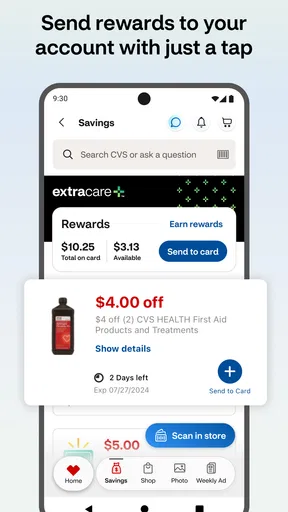
When I am already visiting CVS for a prescription or appointment, browsing products and checking ExtraCare savings in the same app can make the trip more efficient. I can consider the shopping task while planning the pharmacy errand, rather than treating each as a separate visit. The trade-off is that retail offers can compete for attention with health tasks. I find it sensible to finish the prescription or appointment action first, then move to shopping, so a promotion does not distract me from the reason I opened the app.
Digital receipts are another practical part of that routine. Keeping purchase records together can make it easier to check what I bought without saving paper slips, especially if I need to review a recent store purchase. I’d still keep any receipt or order information that matters for a return or reimbursement in a way I can retrieve when needed; a convenient history is helpful, but it is not a reason to assume every record will answer every accounting question.
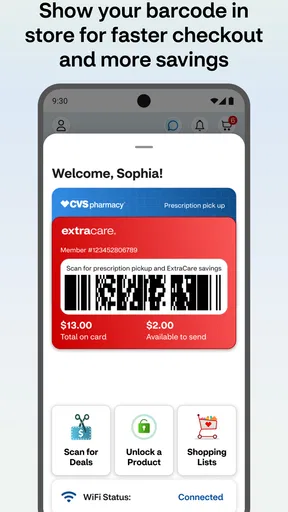
For a household that uses ExtraCare, a small bit of planning can make the shopping side feel less cluttered. I’d check the available savings before heading to the store, then decide whether the items are things I actually need. That is more useful than browsing promotions without a list. Savings features are most valuable when they support a planned purchase, not when they turn a pharmacy visit into an unplanned shopping trip.
Where this app fits—and where it doesn’t
I would recommend CVS Health to someone who fills prescriptions at CVS, uses its health care scheduling, or regularly shops there and wants those errands close together. It can also help a busy household coordinate ordinary tasks: one person can remember to start a refill, another can plan a store visit, and the app gives them a shared place to begin. The key is to treat it as a convenience layer around CVS services rather than a complete picture of someone’s health.
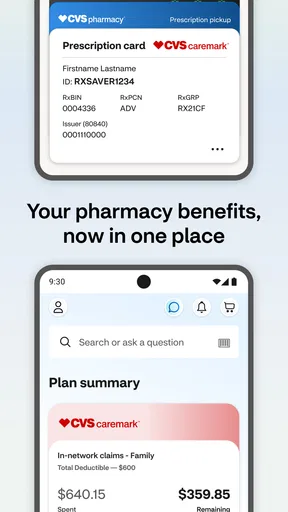
I’d be less enthusiastic about it for someone whose prescriptions are spread across several independent pharmacies, who wants a single record spanning many providers, or who rarely shops at CVS. In those situations, a pharmacy’s own app may be better for a different chain, while a health-record or provider portal may be better for records and care communication. CVS Health’s advantage is the connection between its own pharmacy, care scheduling, and retail functions; that same focus is a limitation if your day-to-day care happens elsewhere.
One tip I’d follow is to use the app for tasks with a clear outcome—starting a refill, arranging an appointment, or checking a planned purchase—and make a separate note for questions that need a person’s judgment. Another is to review the branch and visit details before leaving home, particularly when an errand depends on a specific location. Those small checks help avoid treating a digital confirmation as a guarantee that every part of the real-world handoff is complete.
CVS Pharmacy has developed CVS Health as an everyday utility rather than a specialist medical tool. With 145,000 written reviews alongside its broad user base, opinions are clearly varied, and I can understand why: the app’s usefulness depends heavily on whether CVS is already part of a person’s routine. I’d try it for the tasks I expect to use, then keep the tools that genuinely save time instead of forcing every health need into one app.
If you’ve ever found yourself juggling prescriptions, trying to remember when to take what, or just wanting a more streamlined way to manage your health, then CVS Health might just be the app you need. I took it for a spin to see if it lives up to the hype, and spoiler alert: it’s pretty darn handy.
Easy Navigation and User-Friendly Design
Let’s start with the basics. The CVS Health app is a breeze to navigate. The interface is clean, and everything is right where you’d expect it to be. Whether you’re checking out the pharmacy section or exploring the MinuteClinic options, the layout is intuitive, making it easy even for the less tech-savvy folks.
Managing Prescriptions Like a Pro
One of my favorite features is the prescription management tool. You can refill your prescriptions with just a tap, and it even lets you set reminders so you never miss a dose. If you’re someone who tends to forget, this is a game-changer. Plus, if you need to transfer a prescription from another pharmacy, the app guides you through it seamlessly.
Health and Wellness at Your Fingertips
Beyond prescriptions, the app offers a plethora of wellness resources. From scheduling vaccinations to getting health tips, it’s like having a mini health advisor in your pocket. I found the MinuteClinic feature particularly useful—it lets you find nearby clinics and even book an appointment, which is super convenient for those last-minute health checks.
Shopping and Savings
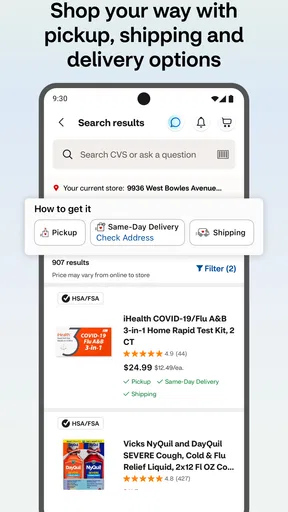
Who doesn’t love a good deal? The app has a dedicated section for shopping where you can browse products available at CVS. It also highlights any ongoing promotions, so you never miss out on savings. And if you’re part of the ExtraCare program, you can easily track your rewards and apply them at checkout directly from the app.
One thing I noticed is how the app integrates digital receipts. No more paper clutter! It’s environmentally friendly and keeps all your purchase history organized in one place. Very neat, right?
The Verdict
After spending some quality time with the app, I can confidently say it’s a must-have for anyone looking to simplify their health management. It’s loaded with features that cater to everyday needs, and its user-friendly design makes accessing these features a breeze.
So, if you’re like me and appreciate having everything health-related in one spot, give this app a whirl. It’s like having a personal health assistant, minus the hefty paycheck!
Privacy and Permissions
See what permissions an app requests and how it handles your data.
- Location
- approximate location (network-based), precise location (GPS and network-based)
- Phone
- directly call phone numbers
- Photos/Media/Files
- read the contents of your USB storage, modify or delete the contents of your USB storage
- Storage
- read the contents of your USB storage, modify or delete the contents of your USB storage
- Camera
- take pictures and videos
- Microphone
- record audio
- Wi-Fi connection information
- view Wi-Fi connections
- Other
- view network connections, pair with Bluetooth devices, access Bluetooth settings, connect and disconnect from Wi-Fi, full network access, control Near Field Communication, run at startup, reorder running apps, control vibration, prevent device from sleeping, read Google service configuration
Verdict
Strengths of CVS Health
- User-friendly interface for easy navigation.
- Wide range of health services available.
- Convenient prescription management features.
- Access to exclusive health deals and discounts.,24/7 customer support for urgent queries.
Limitations of CVS Health
- App occasionally experiences slow loading times.
- Limited functionality without internet access.
- Some features require in-store visits.
- Notifications can be overwhelming at times.
- Account registration process can be lengthy.
Other Releases by CVS Pharmacy
View All
CVS Specialty
Medical3.1
Similar Picks in This Category
View All
WebMD: Symptom Checker
WebMD, LLC4.1

Microphone Amplifier
DOSA Apps4.2

Anatomy Learning - 3D Anatomy
3D Medical OU4.5

Period Tracker and Calendar
SimpleInnovation4.9

GoodRx: Prescription Coupons
GoodRx4.8

MyChart
Epic Systems Corporation4.4
Frequently Asked Questions
What features does the CVS Health app offer?
The CVS Health app provides a variety of features including prescription management, medication reminders, and the ability to refill prescriptions directly from your phone. Additionally, it offers access to health resources, a store locator for CVS pharmacies, and the ability to track your ExtraCare rewards. It's designed to make managing your health needs more convenient.
How secure is the CVS Health app when it comes to personal information?
The CVS Health app prioritizes user security and privacy. It uses encryption to protect sensitive data and follows industry-standard security protocols. Users can set up biometric authentication, such as fingerprint or facial recognition, to add an extra layer of security. It's important to regularly update the app to benefit from the latest security enhancements.
Can the CVS Health app be used without an internet connection?
While some features of the CVS Health app, such as viewing saved prescriptions and reminders, can be accessed offline, most functionalities require an internet connection. This includes updating prescription information, accessing health resources, and using the store locator. An internet connection ensures you have the most up-to-date information and access to all services.
Is the CVS Health app compatible with all devices?
The CVS Health app is available for both Android and iOS devices. However, it requires a minimum operating system version to function properly—typically Android 5.0 and iOS 11 or higher. It's recommended to check your device's compatibility and ensure your operating system is up to date before downloading the app to avoid any functionality issues.
How can I troubleshoot issues with the CVS Health app?
If you encounter issues with the CVS Health app, first try restarting the app or your device. Ensure you have the latest version installed by checking for updates in your app store. For persistent problems, consult the app's help section or contact CVS customer support for further assistance. Clearing the app cache may also resolve certain issues.
